SOFTWARE & AI
Make the systems you already own work together
The short answer
SafeIT connects the systems a plant already owns, so numbers stop being re-keyed between the scale, the ERP, the MES and the spreadsheet on one person's desktop. The work ranges from integrations and small custom applications to dashboards and conservatively scoped AI, and the source code and documentation belong to you.
Walk any plant and you will find the same thing. Somebody reads a number off a scale and types it into the ERP. Somebody exports a report from the MES that tracks production, opens it in Excel, fixes the columns, and emails it to the same three people every Monday. The real production schedule lives in a spreadsheet on one person's desktop, and the ERP holds a version that everybody knows is wrong.
None of that is anyone's fault. It happens because systems were bought at different times, from different vendors, to solve different problems, and nobody was ever paid to make them talk.
The cost is invisible until you add it up: the hours re-keying, the errors from transposed digits, the delay between something happening on the floor and anyone in the office knowing about it, and the fact that your best process knowledge lives in a spreadsheet with no backup and no owner.
This service is about closing those gaps. Sometimes that is an integration. Sometimes it is a small custom application. Occasionally it is artificial intelligence, but a good deal less often than the market currently implies.
What's included
- Integration between systems that don't talk. ERP to scale. MES to quality records. Warehouse scanners to inventory. Label printing driven by the order rather than by re-typing. CRM to ERP. Machine data to a reporting layer.
- Spreadsheet-to-application work. Taking the critical spreadsheet that runs a part of your business and turning it into a proper multi-user system with permissions, history and backup, without losing the logic that made it work.
- Custom applications where nothing off the shelf fits: shop-floor data capture, quality and inspection recording, maintenance logging, custom reporting, internal portals, customer-facing order status.
- EDI and customer-portal integration, the order exchange your customers run on, so purchase orders and shipping notices flow without manual handling. See cloud & business software.
- Reporting and dashboards built for the people who use them: an OEE view a supervisor reads at a glance, not a business intelligence platform nobody logs into.
- Automation of administrative work: invoice and document handling, approval routing, report generation and distribution, repetitive data entry between systems.
- Documentation and handover. Source code, data models, and written documentation belong to you. We build things another developer could pick up.
- AI consulting and practical implementation, scoped conservatively, described in full below.
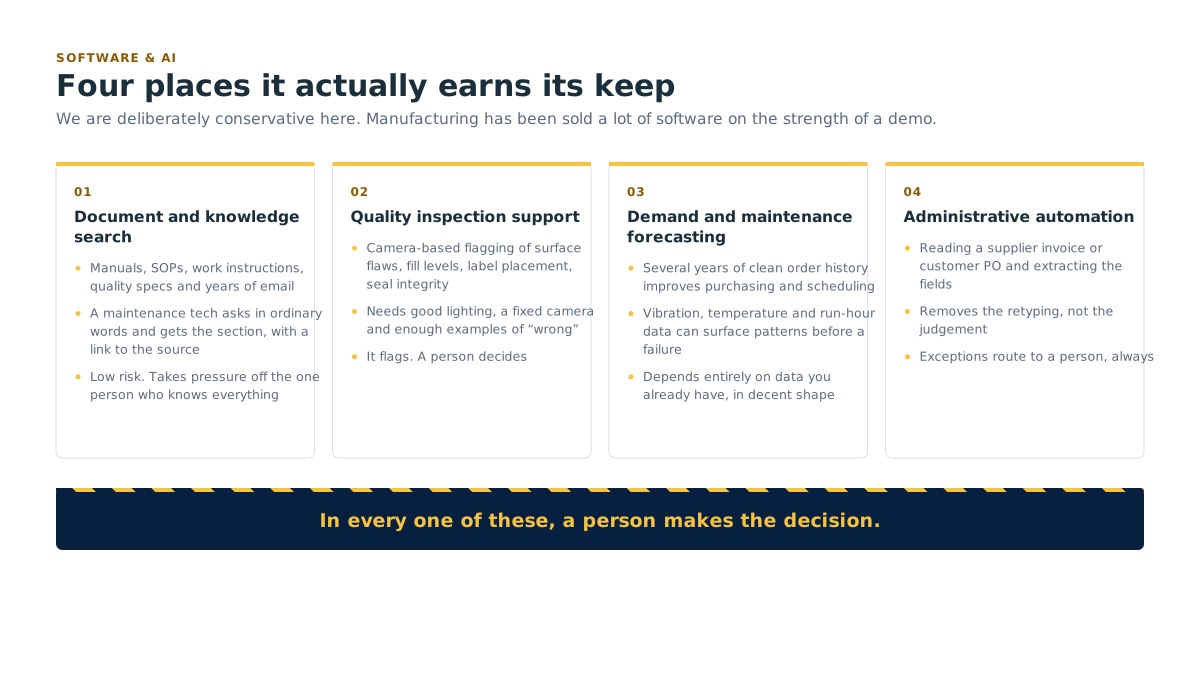
Where AI is genuinely useful on a plant floor
We are deliberately conservative here. Manufacturing has been sold a lot of software on the strength of a demo. Here are the applications we have seen produce real value, described as plainly as we can.
Document and knowledge search. You have machine manuals, standard operating procedures, work instructions, quality specs and years of email. Finding the right page takes a person who has been there fifteen years. AI-assisted search lets a maintenance tech ask a question in ordinary words and get the relevant section, with a link to the source document so they can verify it. Low risk, immediately useful, and it takes pressure off the one person who knows everything.
Quality inspection support. Camera-based systems can flag likely defects, surface flaws, fill levels, label placement, seal integrity, faster and more consistently than a person watching the same line for eight hours. The word to hold onto is support. It flags; a person decides. It works best as a second pair of eyes on a well-defined, repetitive check, and it needs good lighting, a fixed camera position and enough examples of what "wrong" looks like.
Demand and maintenance forecasting. If you have several years of clean order history, forecasting can improve purchasing and scheduling. If you have vibration, temperature or run-hour data from equipment, patterns preceding failure can sometimes be identified early enough to schedule maintenance instead of reacting to a breakdown. Both depend entirely on data you already have, in decent shape.
Administrative automation. Reading a supplier invoice or a customer purchase order, extracting the fields, and putting them into the right system. Drafting routine correspondence. Summarizing a long specification change. This is the least exciting category and often the fastest payback, because it removes hours of typing without touching production.
Where AI is not the answer
This section exists because most vendors will not write it.
Not for machine control or safety functions. Nothing we build lets a model make a control decision on live equipment or interact with a safety system. Those decisions belong to deterministic controls and to people. Full stop.
Not when your data is a mess. AI amplifies the quality of your data. If production records are inconsistent, half your downtime codes are "other," and three systems disagree about inventory, a model will produce confident nonsense. Fix the data and the integration first. That is usually the project, and it is usually the one that pays.
Not for anything requiring a guaranteed answer. Generative models produce plausible output, not certified output. They should never be the final word on a compliance record, a batch release, a customer commitment or a regulatory submission. A person signs.
Not as a replacement for a documented process. If nobody wrote down how the changeover works, AI will not discover it for you. Write it down. Then automation becomes possible.
Not when a simple integration or a report would do. A large share of the "we need AI" conversations we have end with a scheduled report, a database field, or two systems finally exchanging a file. That is a cheaper, more reliable and more supportable answer, and we will tell you when it is the right one.
Not without a human in the loop. Every application we recommend keeps a person making the decision. That is not caution for its own sake. It is the same principle as your safety program: the control does not remove the responsibility.
How it works day to day
We start on the floor, not in a requirements document. We watch the work. Where is a number being re-typed? Where is a person waiting for information? Where does the paper form exist because the system does not do the thing?
We scope small and prove it. The first build is a narrow, useful piece that gets into real use inside weeks. If it does not earn its place, you have not spent a year finding out.
We build on things that can be supported. Standard platforms, documented code, your data in a form you can get at. No black boxes only we can maintain.
Everything is handed over. Source code, documentation, data models and access are yours. If you leave, the work goes with you.
It gets supported like everything else. A custom application is not a one-off delivery. It is on the same helpdesk, in the same monitoring, in the same backup regime. See managed IT & helpdesk.

What this looks like in month one, and in month six
Month 1, Find where the time is going. We map the manual handoffs: what gets re-keyed, what gets exported and reformatted, what gets emailed on a schedule, and which spreadsheets are load-bearing. You get a prioritized list with a rough effort estimate against each, ranked by hours saved and risk removed. Usually one or two items are obvious and cheap.
Month 6: Two integrations live, a spreadsheet retired. The re-keying between the two systems that mattered most is gone. The Monday morning report builds and sends itself. The spreadsheet that ran a critical process is now an application with permissions, history and a backup. If an AI use case cleared the bar, it is running in a narrow, well-defined role with a person still making the call. If none did, we told you so and spent the budget on the integrations instead.
Who this is for
- Plants where the same numbers are entered into two systems every day.
- Operations where the real schedule, the real costing or the real quality log lives in a spreadsheet on one desktop.
- Manufacturers whose ERP does 80% of what they need and whose gap is filled by paper.
- Businesses being asked by a customer for data or documents they cannot currently produce automatically.
- Anyone who has been pitched an AI product and wants a straight assessment of whether it would actually work in their plant.
Delivered by KTI
Development and AI work is delivered by Kearns Technology Inc., our parent company and delivery engine. Alongside managed services, KTI runs a software development and AI consulting practice, with existing work in integration-driven documentation and in supporting critical logistics systems.
That matters for one specific reason: the people building the integration are the people running the network, the servers and the backups underneath it. A custom application built by a firm that never sees your infrastructure tends to become an orphan. This one does not.
How much does a custom build cost?
It depends entirely on scope, and anyone quoting before understanding the work is guessing. What we can commit to is how we price it: a small, fixed-scope discovery first, ending in a written estimate with options, before any development is authorized. Most plants start with an integration in the low tens of thousands rather than a platform project.
Do we own what you build?
Yes. Source code, documentation and data are yours, handed over as part of delivery. We build on standard platforms so another developer could take it on if you ever wanted them to.
We were told AI could optimize our production schedule. Is that real?
Sometimes, and it depends on your data. Scheduling optimization works when constraints, changeover times, run rates and demand are recorded accurately and consistently. In KTI's experience across plants, they usually are not: changeover times are estimates, downtime coding is inconsistent, and the real schedule is adjusted verbally each morning. Fix the data capture and you may not need the optimizer. Fix it and still want one, and now it can actually work.
Will this replace people?
The applications we recommend take away typing, searching and waiting. In practice that means the quality tech spends more time on the line and less on the form, and the maintenance planner spends less time hunting through manuals. If somebody sells you AI on a headcount reduction, ask them which specific job and how they measured it. We would rather talk about hours returned to work that needs a human.
What this means for your plant
The numbers get entered once, by one system, into every place they need to go. The spreadsheet that runs your process becomes a real application you own. We will tell you when AI is not the answer, which is more often than the market suggests.
Related
- Pairs with Cloud & business software: integration usually starts at the ERP.
- Pairs with Legacy & critical-system continuity: when the long-term answer is a replacement build.
- See also Managed IT & helpdesk and Network & infrastructure.
- Membership: advisors on call, for a straight answer before you buy anything.
- Book a free assessment: includes a look at where your systems are not talking to each other.
- All services · Contact