CLOUD & BUSINESS SOFTWARE
The systems your plant actually runs on
The short answer
SafeIT manages the business systems a plant runs on, including Microsoft 365 and its backup, Azure and AWS, ERP and MES support, and EDI with your customers, and deals with the software vendors on your behalf. Licensing comes through Pax8 at member rates, and migrations are scheduled into shutdowns, changeovers or quiet weeks with a tested rollback.
Your ERP holds the orders, the inventory, the costing and the shipping paperwork. Your MES, the system that tracks production on the floor: the manufacturing execution system, the layer that tracks what is actually being made right now, holds production. Your customers send purchase orders by EDI and expect an advance shipping notice back, correctly formatted, or the load gets rejected at their dock. Somewhere in the middle, Microsoft 365 holds the email and the files, and Azure holds whatever got moved there over the last few years.
When these things work, nobody thinks about them. When they don't:
- The ERP is slow every day between 2pm and 4pm and everyone has just accepted it.
- An EDI document fails and nobody notices until the customer calls about a chargeback.
- The Azure bill has grown every quarter and nobody can explain which line item is doing it.
- A cloud migration was half done in 2021, so some things are up, some are down, and both need supporting.
- The ERP vendor blames the network. The network provider blames the ERP. You are the referee.
That last one is the real problem. We take the referee job away from you.
What's included
- Microsoft 365 management: email, Teams, SharePoint and OneDrive, identity and access, multi-factor authentication, retention, and shared floor accounts handled sensibly rather than as a security hole.
- Microsoft 365 backup, because Microsoft keeps the service running and you remain responsible for your data.
- Azure design, management and cost optimization. Right-sizing, reserved capacity, unused resource cleanup, storage tiering, and a monthly bill somebody can explain line by line.
- AWS where it is the better fit or where you already run there.
- ERP and MES support: day-to-day user support, performance work, server and database health, upgrade planning, and acting as your representative to the software vendor.
- Integration between systems so data stops being re-keyed. ERP to MES, ERP to warehouse scanning, scale to production record, quality results to the batch file. See software & AI.
- EDI with your customers: electronic data interchange, the structured document exchange large customers require. Setup, mapping, monitoring, failure alerting and troubleshooting when a trading partner changes a spec.
- Licensing through Pax8, our cloud procurement partner and the source of member discounts on Microsoft and other vendor licensing. Licence counts get reviewed, not renewed on autopilot.
- Migrations planned around production: scheduled into shutdowns, changeovers or quiet weeks, with a tested rollback.
- Hybrid design. Some workloads belong in the cloud. Some belong on a server in your building. We are explicit about which is which.
- Identity and access control aligned with onboarding and offboarding, so the person who left in March does not still have an active mailbox.
Honest advice about what should stay on site
Plenty of providers will tell you everything belongs in the cloud. In an office, that is close to true. In a plant, it is not.
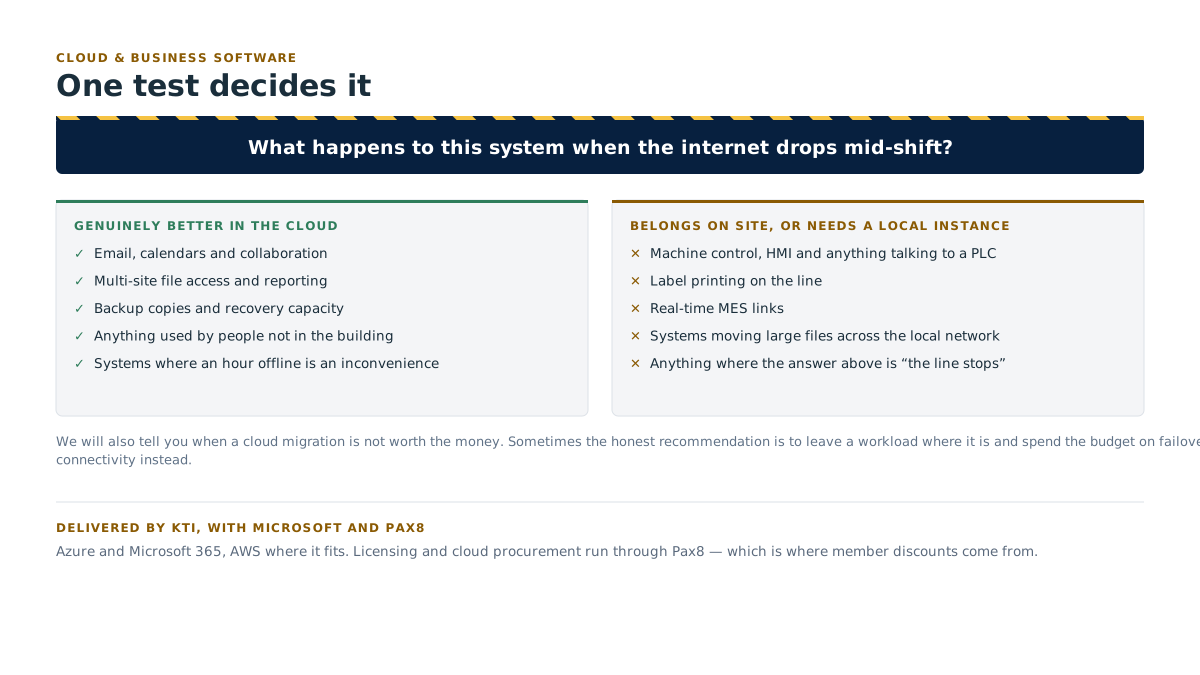
The test is simple: what happens to this system when the internet drops mid-shift?
If the answer is "the line stops," it belongs on site, or it needs a local instance that keeps running while the connection is down. Machine control, HMI systems, label printing on the line, real-time MES links and anything talking directly to a PLC generally stay local. So do systems that move large files constantly across a local network, because you will pay for that traffic twice.
What genuinely benefits from cloud: email, collaboration, multi-site file access, reporting, backup copies, disaster recovery capacity, and anything used by people who are not in the building.
We will also tell you when a cloud migration is not worth the money. Sometimes the honest recommendation is to leave a workload exactly where it is and spend the budget on failover connectivity instead. See network & infrastructure.
How it works day to day
Your users call us for the software, not just the hardware. A packing clerk who cannot post a shipment gets the same helpdesk as somebody with a broken laptop. One number for all of it.
We own the vendor conversations. When the ERP reseller and the network need to talk to each other, we run that call. You get the outcome, not the transcript.
EDI is monitored, not assumed. Failed documents raise an alert to us, not a chargeback to you six weeks later.
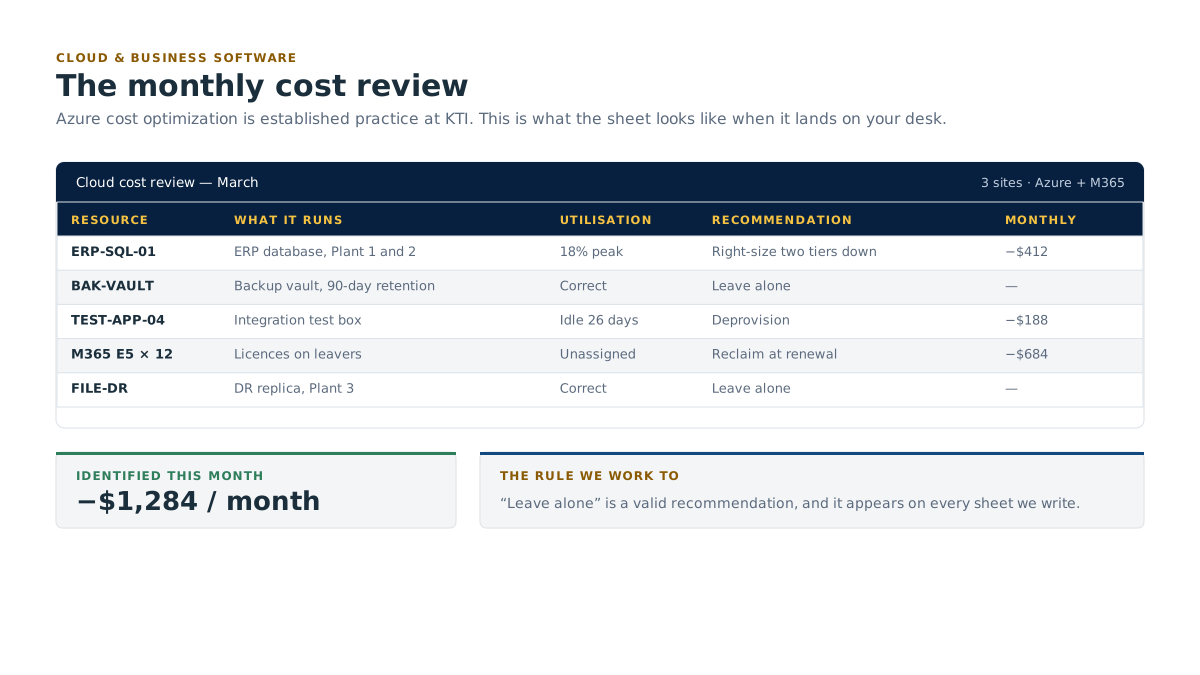
Cloud spend is reviewed monthly. Azure and licence costs are checked against actual usage. Unused licences get removed. Over-provisioned resources get right-sized. Growth gets explained before the renewal, not after.
Change lands on your calendar. Migrations, upgrades and cutovers are scheduled against your production plan, with a rollback path defined before we start.
What this looks like in month one, and in month six
Month 1, Inventory and the obvious wins. We document every business system, who depends on it, what it is licensed for and what it costs. Microsoft 365 gets a security and configuration review, multi-factor authentication gets sorted where it is missing, and 365 backup gets turned on. The cloud bill gets a first pass, unused licences and idle resources are usually visible in week one. You get a written system map and a cost baseline.
Month 6: Fewer surprises, lower run rate. Azure spend is right-sized and predictable, with a monthly review somebody can explain to the controller. EDI failures are caught by monitoring instead of by your customer. The ERP performance complaint that everyone had accepted has a root cause and a fix. Migrations that make sense have been done inside planned windows, and the ones that did not make sense were not done. Licensing runs through Pax8 at member rates.
Who this is for
- Manufacturers running an ERP with no internal owner, where support ends at whatever the reseller feels like.
- Operations with EDI requirements from large customers and nobody who understands the mapping.
- Plants with a growing Azure or Microsoft 365 bill that nobody can account for.
- Businesses part-way through a cloud migration that stalled, now supporting both worlds.
- Multi-site manufacturers who need shared files, shared identity and shared reporting across plants and countries.
- Anyone paying for licences they stopped using two staff changes ago.
Delivered by KTI, with Microsoft and Pax8
Cloud and business software work is delivered by Kearns Technology Inc., our parent company and delivery engine, working since 2010 across Canada, the United States, the United Kingdom and Germany.
Azure cost optimization is established practice at KTI with real case-study depth, alongside integration-driven documentation and supporting a highly dispersed workforce. Licensing and cloud procurement run through Pax8, which is where member discounts come from. Platforms are Microsoft Azure and Microsoft 365, and AWS where it fits.
Can you support our ERP if you didn't sell it to us?
Yes. We support the systems you already run, and we work alongside your existing ERP vendor or reseller rather than trying to replace them. Our job is the infrastructure it runs on, the day-to-day user support, the performance, the integrations and the vendor management. If you are considering a change of ERP, we can help you evaluate it, but we do not have a horse in that race.
How much can Azure cost optimization actually save?
It varies too much to promise a number honestly, and anyone quoting you a percentage before looking at your environment is guessing. What we can say is what we look at: idle and over-provisioned resources, storage sitting in the wrong tier, unused licences, and workloads that would be cheaper under reserved capacity. You get the findings and the projected saving in writing before any change is made.
We're on Microsoft 365. Do we still need backup?
Yes. Microsoft's job is keeping the service available. Your data is still your responsibility: deletions, a compromised account, a retention policy misconfiguration, or a departing employee clearing a mailbox are all on your side of the line. 365 backup is included in how we set members up. See business continuity & disaster recovery.
When do you do migrations?
In your window, not ours. Shutdown weeks, statutory holidays, planned changeovers, or the quiet stretch between shifts. Every migration has a tested rollback before we start, and the criteria for calling it off are agreed in advance so the decision is not made under pressure at 4am.
What this means for your plant
One team supports the ERP, the cloud and the network, so nobody gets to blame anybody else. Your cloud bill gets reviewed monthly and explained in plain numbers. We will tell you which systems should stay on site, even when that means selling you less.
Related
- Pairs with Software & AI: when the answer is integration or a custom build rather than another licence.
- Pairs with Network & infrastructure: cloud is only as good as the connection under it.
- See also Managed IT & helpdesk and Business continuity & disaster recovery.
- Membership: Pax8 procurement pricing is part of membership.
- Book a free assessment: includes a Microsoft 365 configuration review and a first look at cloud spend.
- All services · Partners · Contact