
NETWORK & INFRASTRUCTURE
A network that survives your building
The short answer
SafeIT designs, installs and documents networks built for plant conditions: wireless surveyed around metal racking, forklifts and cold rooms, office traffic kept apart from production machines, and failover internet so a cut fibre does not stop shipping. Hardware comes through Dell, Lenovo, Supermicro and Ingram Micro with warranty and end-of-support dates tracked, and every site is built to the same design standard.
Office networks are designed for drywall, carpet and people sitting still. Yours has to work through steel racking, moving forklifts, wash-down bays, freezer doors, welding, dust and a mezzanine that was added after the original cabling was run.
The symptoms are always the same. Scanners drop in one specific aisle and nobody knows why. The Wi-Fi is fine until the racking is full, then it isn't. The office and the production network are the same flat network, so a laptop problem can reach a PLC: a programmable logic controller, the small computer that actually runs a machine. Internet goes down and shipping stops, because there is one line into the building and no second path.
And underneath it all: no one has a current diagram. The last person who understood the layout left, and what exists now is whatever got added since.
What's included
- Site surveys before anything gets quoted. We walk the building, measure signal in the aisles, look at what the racking does when it's full, and check the cold rooms. Guessing at coverage from a floor plan is how you get dead zones.
- Plant-floor wireless design and installation. Access point placement for real conditions: metal racking, moving equipment, high ceilings, roaming handhelds and forklift-mounted terminals that must not drop mid-aisle.
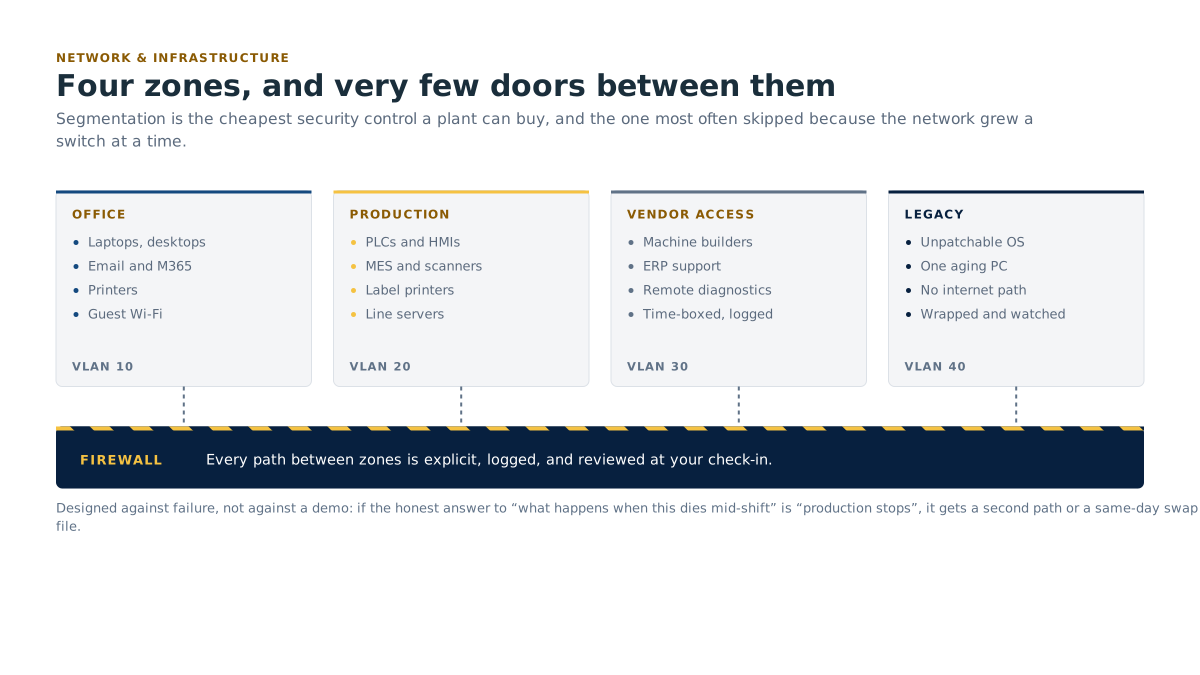
- Network segmentation. Separating office traffic from production traffic, designed to keep an office incident from reaching the machines, with controlled paths where the two genuinely need to talk. Guest and vendor access kept off both.
- Switching and structured cabling, including industrial-rated gear where the environment demands it.
- Cabling in harsh environments: dust, wash-down, chemical exposure, cold storage, high vibration. Correct enclosure ratings, correct cable jackets, correct terminations, sealed penetrations.
- Failover connectivity. Peplink and SD-WAN: software-defined wide area networking, which is the technology that lets a site use two or more internet connections at once and switch between them automatically. A cut fibre becomes a slower afternoon, not a stopped shipment.
- Firewalls and remote access, including controlled vendor access so an equipment manufacturer can dial in for support without a standing open door.
- Servers, virtualization and storage: on premises, hybrid or hosted, sized to what you actually run.
- Hardware supply and lifecycle through Dell, Lenovo, Supermicro and Ingram Micro, with warranty tracking and end-of-support dates recorded so refreshes land in the budget instead of in an emergency.
- Documentation. Current diagrams, port maps, IP schedules, and a labelled cabinet. Written down, kept current, handed to you.
- Multi-site standards. The same design pattern at every plant, so the network in Plant 3 is not a mystery to whoever supports Plant 1.
How it works day to day
We design against failure, not against a demo. Every design starts with the question: what happens when this piece dies during a shift? If the answer is "production stops," we build a second path or a fast swap.
Change happens on your calendar. Switch replacements, firmware upgrades and cutovers get scheduled against your production plan: during shutdown, changeover, or the quiet window between shifts. Not on a Tuesday at 2pm because that's when the engineer was free.
Monitoring runs continuously. Access points, switches, firewalls, circuits and servers are watched. We find out about a failing uplink or a saturated circuit before the warehouse does.
Spares are planned, not scrambled. For anything that stops production when it dies, we keep the spare strategy on file: cold spare on the shelf, hot standby, or a same-day replacement path with the vendor.
On-site work is real. Cable runs, cabinet builds, access point installs and site surveys need hands. We travel for those across our coverage in Canada, the United States, the United Kingdom and Germany.
What this looks like in month one, and in month six
Month 1, Find out what's actually there. A site survey and a full inventory. We map the network as it exists, not as it was drawn in 2014. Expect to learn something uncomfortable: an unmanaged switch behind a filing cabinet, a flat network with no separation, an access point pointed at a wall. You get a diagram, a risk list ranked by production impact, and a costed plan for the fixes that matter most.
Month 6, The aisle that dropped scanners doesn't anymore. Wireless coverage has been remediated where it was failing. Office and production traffic are separated. Failover connectivity is in place and has probably already saved you once without anyone noticing. Hardware is inventoried with warranty and end-of-support dates, so the server refresh is a planned capital line rather than a fire. And there is a current diagram on the wall of the network cabinet.
Who this is for
- Warehouses and plants where handheld scanners or forklift terminals drop connection in known trouble spots.
- Plants where the office and production networks are the same flat network, or nobody is sure.
- Sites with a single internet connection and no failover, where an outage stops shipping.
- Food and beverage processors with wash-down areas, cold storage or humidity that eats ordinary equipment.
- Operations that have outgrown a network nobody ever designed, it just accumulated.
- Multi-site manufacturers who want one standard everywhere instead of three different setups.
Delivered by KTI, with hardware from partners you know
Network and infrastructure work is delivered by Kearns Technology Inc., our parent company: network technicians and consultants who have been doing this since 2010 across Canada, the United States, the United Kingdom and Germany.
Hardware comes through Dell, Lenovo, Supermicro and Ingram Micro. Failover and SD-WAN uses Peplink. These are standard, supportable, widely available platforms. We do not build you a network that only we can maintain: if you ever leave, the documentation and the equipment go with you.
KTI's existing work includes unifying multi-site IT under one corporate program and supporting critical logistics systems, both of which live or die on the network underneath.

Our Wi-Fi is fine most of the time. Do we really need a survey?
"Fine most of the time" usually means fine when the racking is half empty. Metal absorbs and reflects signal, so a warehouse behaves differently at full inventory than at low stock. A survey takes measurements in the conditions that actually cause trouble, and it usually costs less than the picking hours you are losing.
What does segmentation actually change for us?
Two things. First, the network is architected so a problem on the office side, a bad laptop, a compromised email account, is contained away from the equipment that runs your line. Second, when a customer or insurer asks whether your production network is separated from your business network, you have a real answer and a diagram to show. It is the same logic as a machine guard: a barrier between the thing that can go wrong and the thing that must not.
Do we need failover internet if we've only had one outage in five years?
Depends on what that outage cost. That is the whole calculation. If a day without the internet means no scanning, no shipping paperwork, no EDI, the order exchange your customer relies on, and no order entry, then a second connection is inexpensive by comparison. If you can run a shift on paper, maybe not. We will tell you which one you are.
Can you support equipment your predecessors installed?
Yes. We do not require a rip-and-replace to take you on. We inventory what is there, document it, identify what is unsupportable or unsafe, and prioritize replacement by production risk and end-of-support date, not by what is easiest for us to sell.
What this means for your plant
Wireless designed for full racking and moving forklifts, not for an empty building. Office problems stay on the office side of the fence, away from your machines. A cut internet line becomes an inconvenience, not a stopped shipment.
Related
- Pairs with Managed IT & helpdesk: the network is what most plant-floor tickets are really about.
- Pairs with Legacy & critical-system continuity: isolating an old machine starts with segmentation.
- See also Cyber resilience and Business continuity & disaster recovery.
- Membership: onboarding waived, and procurement pricing on hardware and licensing.
- Book a free assessment: includes a walk of your site and a look at your current network.
- All services · Partners · Contact