
LEGACY & CRITICAL-SYSTEM CONTINUITY
The 1998 machine that still runs the line
The short answer
SafeIT keeps old, unsupported machines and the PCs that run them working safely, instead of refusing to touch them or insisting on a six-figure replacement. The service isolates each system on its own network segment, adds compensating controls, virtualizes dying hardware, keeps a tested disk image and a shelf spare, and plans modernization around your shutdowns and capital cycle.
It was bought before some of your operators were born. It works. It has never given you a serious problem. It produces the part your biggest customer buys.
And it only talks to one PC, running an operating system that went out of support years ago, sitting on a network with everything else because that is how it was plugged in. The vendor who wrote the software has been out of business since 2011. There is one spare hard drive in a drawer. Nobody has ever imaged the machine. The person who understood the configuration retired.
Most IT providers respond to this in one of two ways. They refuse to touch it, and quietly write it out of the contract. Or they tell you to replace it: a six-figure capital project with a three-month qualification cycle, to solve a problem that is currently not stopping anything.
Neither is a real answer. So we built a service around the third one.
You already know this pattern from the safety side of the plant. Nobody scraps an old press because it predates the current guarding standard. You assess it, you guard it, you document the procedure, you train on it, and you plan the replacement for when it makes sense. That is exactly what we do here.
What's included
- Discovery and inventory of critical old systems. Which machines depend on which computers, which operating systems and software versions are involved, who the vendor was, what still has support and what does not.
- Risk ranking by production impact. Not by how old it is. By what stops if it dies, and how long you would be down.
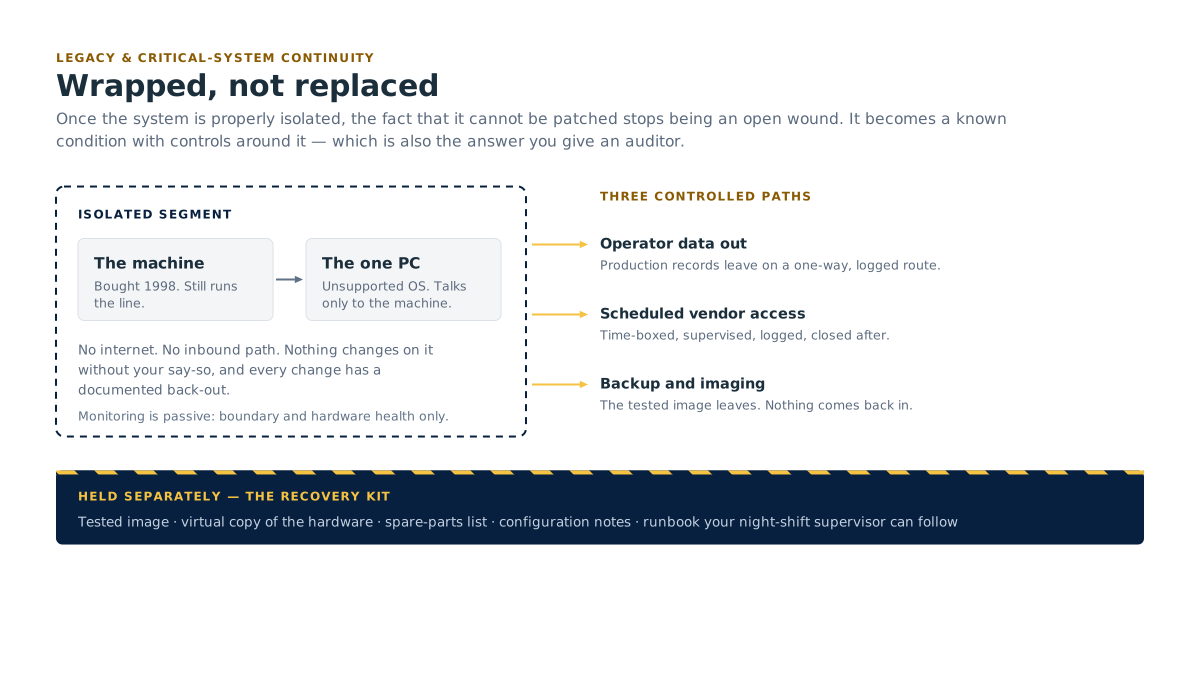
- Isolation and network wrapping. Putting the legacy system on its own controlled segment with tightly defined paths in and out, designed so an unpatchable machine is not reachable from the rest of the business and should not be able to reach out where it shouldn't.
- Compensating controls for systems that cannot be patched or protected conventionally: strict access control, controlled removable media handling, monitoring at the boundary, locked-down remote vendor access.
- Virtualization of dying hardware. Converting a physical machine to a virtual one, physical-to-virtual conversion, or P2V, so the software keeps running when the 20-year-old motherboard finally fails. This is often the single highest-value thing we do in the first quarter.
- Full disk imaging and a tested restore path. Not "there is a copy somewhere." An image we have actually restored onto replacement hardware.
- Spare-parts strategy. Identifying the parts that stop production, sourcing replacements while they still exist, and holding a documented shelf spare. Old serial cards, specific interface adapters, matching drives, licence dongles.
- Documentation of undocumented systems. How it is configured, how it talks to the machine, what the settings mean, what to do when it fails, and what breaks if you change it. Written for the person who will need it at 2am, not for an engineer.
- Vendor and licence archaeology. Tracking down whether support, source code, dongles or replacement licences still exist anywhere, and archiving what we find.
- A staged modernization plan with real costs and real timing, sequenced around your shutdowns, your customer qualifications and your capital cycle.
How it works day to day
Nothing changes on the machine without your say-so. We do not push updates to a system that runs production. Every change is planned, scheduled against your production calendar, and has a documented back-out.
The isolation does the heavy lifting. Once the system is properly wrapped, the fact that it cannot be patched stops being an open wound. It is a known condition with controls around it, which is also the answer you give an insurer or a customer auditor when they ask about unsupported operating systems.
Monitoring is passive. We watch the boundary and the hardware health, disk, temperature, drive errors, without installing anything intrusive on a system that might not tolerate it.
We hold the recovery kit. The tested image, the virtual copy, the spare parts list, the configuration notes and the recovery runbook live somewhere your night-shift supervisor can get to them.
Modernization is a conversation, not a countdown. At each scheduled check-in we revisit the plan: what has become riskier, what has become cheaper to replace, what your customers are now requiring, and whether the next shutdown is the right window.
What this looks like in month one, and in month six
Month 1: Stop the bleeding, write it down. We find every legacy dependency in the plant, including the ones nobody mentions in the kickoff meeting. We rank them by what stops if they fail. The highest-risk system gets imaged and isolated first, usually within weeks. You get an inventory, a risk list, and an honest statement of which systems are one hardware failure away from a serious problem.
Month 6, The old machine stops being the thing you worry about. Critical legacy systems are isolated, imaged, and where practical running virtualized on modern hardware. Spares are on the shelf for the parts that matter. The undocumented system is documented. You have a written modernization plan with costs against the next two capital cycles, and you are choosing when to act instead of waiting for a failure to choose for you.

Who this is for
- Plants with production equipment older than the software industry's memory, still earning money every shift.
- Anyone running Windows XP, Windows 7, Windows Server 2003 or 2008, or an unsupported Linux build because the machine software will not run on anything newer.
- Operations with a single physical PC whose failure stops a line, with no image and no spare.
- Manufacturers whose insurer or customer has started asking specifically about unsupported operating systems.
- Anyone who has been told by an IT provider that they will not support the system, or that the only option is replacement.
- Food and beverage processors where a legacy system holds batch or lot records that must be produced on demand.
Why most providers say no
Legacy work is unglamorous, it carries risk, and it cannot be templated across a hundred customers. It is easier to write it out of scope.
We take it on for a straightforward reason: it is the single most common cause of serious, avoidable downtime in the plants we walk into, and refusing to deal with it does not make it go away. Revitalizing legacy systems is established work for Kearns Technology Inc., our parent company and delivery engine, alongside supporting critical logistics systems and ransomware data recovery. Old systems that must not stop is a category KTI has been working in since 2010.
We will be honest with you about the limits. Some systems genuinely cannot be made safe, only contained. Some parts genuinely cannot be sourced. When that is the case we say so in writing, tell you what the exposure is, and help you plan the replacement rather than pretending the problem is solved.
Will you make us replace it?
No. Replacement is one option on a plan, sequenced when it makes operational and financial sense. Plenty of systems we wrap are still running years later, safely, because containment and a tested recovery path solved the actual risk.
Can you really run a 1998 machine's software on new hardware?
Often, yes. Virtualization lets the old operating system and software run inside a modern server, so the hardware failure risk largely disappears. It is not universal: some systems depend on physical interface cards, timing behaviour or hardware licence dongles that do not virtualize. We test before we promise, and we tell you which category you are in.
Our insurer asked about unsupported operating systems. What do we say?
You say you have them, that they are isolated on a controlled network segment with defined compensating controls, that they are imaged with a tested restore path, and that there is a documented modernization plan with dates. That is a materially different answer from "yes, and it's on the main network." We help you write it, and it is one of the reasons this service pays for itself. See also cyber resilience.
What if the original vendor is gone and nobody knows how it's configured?
That is the normal case, not the exception. We reverse-document it: observe how it behaves, capture the configuration, trace what it talks to, interview the people who have run it longest, and write it down. Undocumented is a state we fix, not a reason to walk away.
What this means for your plant
Your oldest critical system gets isolated, imaged and documented, not condemned. A hardware failure on a 20-year-old PC stops being a production emergency. You replace it when your capital plan says so, not when it dies.
Related
- Pairs with Network & infrastructure: isolation depends on proper segmentation.
- Pairs with Business continuity & disaster recovery: the tested image and restore path are part of your recovery plan.
- See also Cyber resilience for the compensating controls, and Software & AI if the long-term answer is a replacement build.
- Membership: the free assessment covers your legacy exposure, member or not.
- Book a free assessment: we will tell you which of your old systems is closest to failing.
- All services · Contact