
Draft: this page is held for legal review and is excluded from search indexing
TRAINING
Training that runs the way your safety training already does
Your plant already trains people. Not because a policy demanded it: because it works, and because everyone accepts that it's part of the job.
Somebody stands up before shift with a one-page sheet. It takes five minutes. Nobody is punished for admitting they didn't know something. It happens again next month with a different topic. The sign-off sheet goes in a binder, and when an auditor asks, the binder comes out.
We are not inventing a habit. We are putting IT into one you already have.

Why generic training fails on a plant floor
Most security awareness training is built for an office worker at a desk with a laptop, a company email address and thirty spare minutes. Roll it out in a plant and it fails in five specific ways.
Shift workers
Half your workforce isn't there when the module goes live. Nights and weekends get it late or never, and the completion report stalls partway and stays there.
Shared terminals
Six people, one login, no individual training record. The platform can't tell who did what, so the evidence is worthless even when the training landed.
Limited screen time
A line operator has minutes, not half-hours, and those minutes are between the shift ending and the drive home. A 35-minute module is not going to be watched. It's going to be clicked through with the sound off.
Low email volume in some roles
Training that is entirely about email is irrelevant to a crew that barely gets email, and it teaches them that this whole subject is somebody else's problem. Meanwhile the actual risk to them is a USB stick, a shared password, a contractor at a panel, or a phone call to the shipping desk.
English as an additional language
On a lot of crews, a fair proportion of people are working in their second or third language. Training written in corporate English does not reach them, and pretending otherwise gives you a completion number instead of an outcome.
So the training has to be short, delivered in the slot that already exists, meaningful to someone who never touches email, and available in the languages your crews actually speak.
The program: BullPhish ID
SafeIT delivers awareness training and phishing simulation through BullPhish ID. Membership covers every user, run on a schedule, with the reporting handled for you.
How a campaign runs
- Baseline. Before anyone is trained, we run one simulated phishing message across the group. Nobody is warned. This produces a starting number, your baseline click rate, and it is the only number that matters at the beginning, because everything after it is measured against it.
- Assign. Short modules go out by role, not to everyone at once. Plant floor gets plant floor content. AP gets invoice fraud content.
- Simulate. Realistic lures land at a normal cadence, drawn from the scenario set in Section 4.
- Teach at the moment of the click. Anyone who clicks lands on a short page that explains what the tell was, in plain language, right then, not in a report they never see.
- Report. The plant manager gets a one-page view: click rate, report rate, trend, and which departments need attention.
- Repeat. Quarterly at minimum. Continuous with membership.
Cadence
Simulations run monthly to quarterly depending on role and risk. Training modules run quarterly. New starters get an assignment on day one, tied to the onboarding checklist in the library.
What a plant manager sees
Not a dashboard nobody logs into. A one-page monthly summary, by email: overall click rate this period against baseline, report rate (rising is the goal), a per-department breakdown, who is outstanding on training, and one recommended action. If you want the detail, the portal has it. If you don't, the page is enough.
How it becomes audit evidence
Every completion and every simulation result is timestamped, exportable and attributable to a named person. That export is the same shape as your safety training record: who, what, when, signed. It answers the awareness-training question on an insurance renewal, on a customer questionnaire, and in a NIST or ISO evidence package. See NIST readiness.
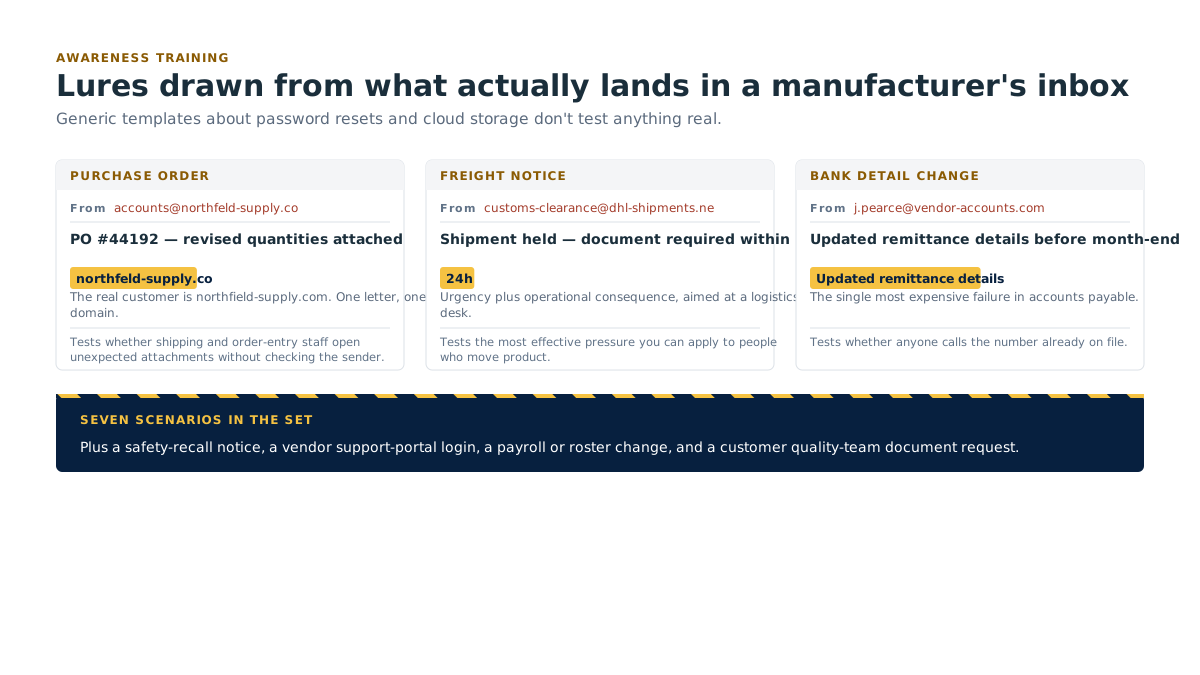
Simulation scenarios built for a plant
Generic templates about password resets and cloud storage don't test anything real. These are drawn from the messages that actually land in a manufacturer's inbox.
| # | The lure | What it tests |
|---|---|---|
| 1 | A purchase order arrives as an attachment from a name close to a real customer's | Whether shipping and order-entry staff open unexpected attachments without checking the sending address |
| 2 | A freight or customs notice claiming a shipment is held pending a document | Urgency plus operational consequence, the most effective pressure you can apply to a logistics desk |
| 3 | A long-standing supplier writes to update their bank details before month-end | The single most expensive failure in AP. Tests whether anyone calls the number already on file |
| 4 | A safety-recall notice for a component on your line, with a "confirm receipt" link | Exploits the one thing this workforce will never ignore. Tests whether safety urgency bypasses the sender check |
| 5 | An equipment-maintenance vendor asks you to log in to their new support portal | Credential harvesting aimed at maintenance and engineering, who genuinely do log into vendor portals |
| 6 | A payroll or shift-schedule change notice with a link to "view your new roster" | Reaches floor staff who get almost no other email. High personal relevance, low suspicion |
| 7 | A customer's quality team requests audit documents through an unfamiliar file link | Tests quality and compliance staff, who are trained to be responsive to customer document requests |
| 8 | An executive asks for a wire transfer during a shutdown or holiday week | Authority plus absence. Tests whether the finance control survives the person who normally approves being unreachable |
| 9 | Repeated MFA approval prompts, the second check beyond the password, at an awkward hour | MFA fatigue. Tests whether people approve a prompt just to make it stop, and whether they report it afterwards |
| 10 | An HR benefits enrolment deadline with a portal login | Personal, deadline-driven, and hits everyone in the company regardless of role |
| 11 | A file-share notification from a colleague's real display name, wrong address | Tests the second-line check, display name versus actual sender, which is the tell in most real attacks |
| 12 | An IT support message asking a user to read back a code to confirm identity | Tests the one absolute rule: nobody legitimate ever asks for your code |
Role-based tracks
Four tracks. Nobody sits through content written for someone else's job.
| Track | Who's in it | Length | Format | Cadence |
|---|---|---|---|---|
| Plant floor & shift staff | Operators, packers, shipping, sanitation, anyone on a line or a shared terminal | 3–5 minutes per module | Toolbox talk script for shift start, plus a short video for break-room screens or personal phones | One topic per quarter, delivered across all shifts within the same week |
| Maintenance & engineering | Maintenance techs, controls engineers, anyone who escorts contractors or touches an HMI screen | 8–12 minutes | Short module plus a hands-on checklist against a real machine | Quarterly, aligned to planned maintenance windows |
| Office & finance | AP, purchasing, order entry, HR, admin: the people who can move money or change a record | 10–15 minutes, AP fraud focus | Module plus monthly simulation, weighted to invoice and bank-detail lures | Monthly simulation, quarterly module |
| Leadership | Owner, plant manager, ops director, controller, anyone whose name carries authority | 15–20 minutes | Briefing plus a short tabletop exercise | Twice a year, plus targeted simulation |
Plant floor and maintenance tracks pair directly with the toolbox talks in the library: same topic, same month, so the crew hears it twice from two directions.
Nobody gets disciplined for clicking
Say this out loud, in writing, before the first simulation goes out. We'll give you the wording.
Clicking is not a disciplinary matter. It never will be
The click is the training. It is the cheapest lesson your plant will ever buy, and it costs nothing precisely because it happened in a simulation instead of on a Tuesday afternoon.
We do not publish name-and-shame lists
Reporting is at department level. Individual results exist for assigning follow-up training and for nothing else.
Reporting a message is always the right answer, including when it turns out to be real, and including when the person reporting it already clicked. A crew that reports late is worth ten times a crew that hides it.
This is exactly how near-miss reporting works on your floor, and for exactly the same reason: the moment people fear the consequence of reporting, you stop hearing about anything and your numbers get beautiful while your risk goes up.
The Email & phishing reporting policy in the library includes this statement as standard text. Have your own counsel and, where applicable, your works council review it before you circulate it.
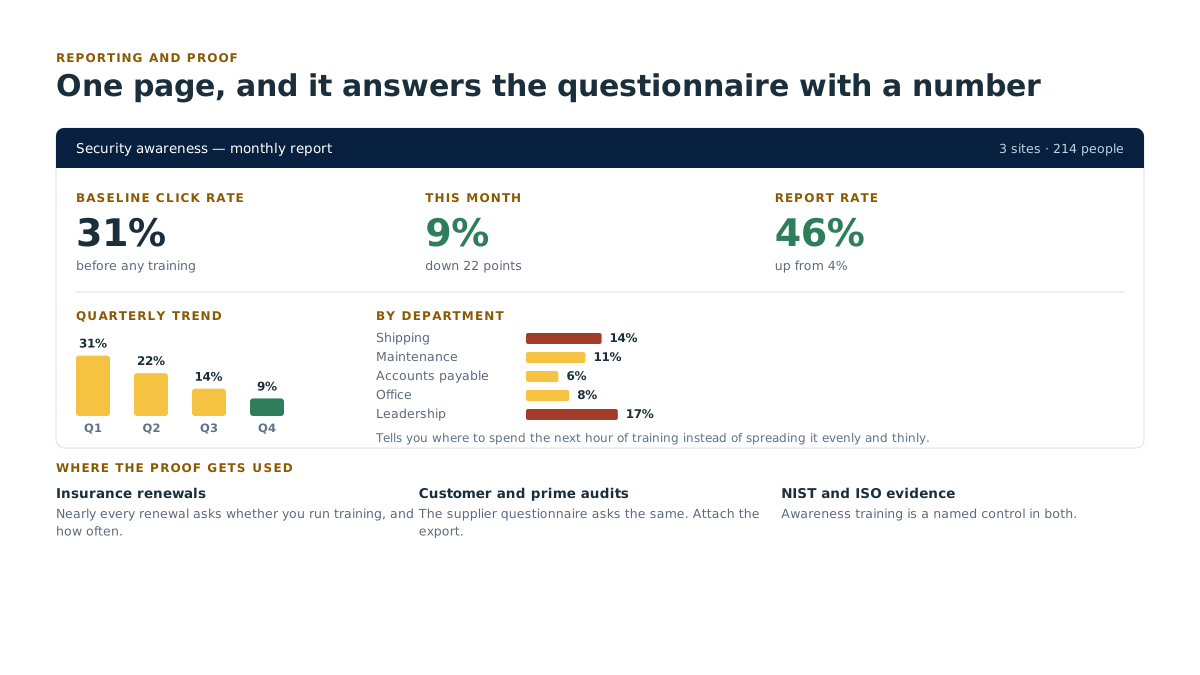
Reporting and proof
Baseline click rate
Your starting number, before any training. Nobody's baseline is good. That's the point of measuring it.
Trend
The same test repeated. Click rate falling and report rate rising, quarter over quarter, is the outcome you're buying.
Per-department breakdown
Shipping, maintenance, AP, office, leadership. Tells you where to spend the next hour of training instead of spreading it evenly and thinly.
Certificates and completion records
Per person, timestamped, exportable. Print them, file them the way you file safety training records.
Where the proof gets used:
- Insurance questionnaires: nearly every renewal now asks whether you run security awareness training and how often. This answers it with a number instead of a yes.
- Customer and prime-contractor audits: the supplier questionnaire asks the same question. Attach the export.
- NIST and ISO evidence: awareness training is a named control in both. The completion export is the evidence. More at NIST readiness.
Access and cost
| What | Access |
|---|---|
| A sample training module | Community: downloads on a free account |
| Baseline phishing test | Part of the free assessment: open to anyone, member or not |
| Awareness training seats | Member: every user, scheduled and reported |
| Ongoing phishing simulation campaigns | Member: continuous, with reporting |
| Generic toolbox talk scripts and posters | Community: in the library |
| Talks and posters carrying your own lines and numbers | Member |
| Role-based track configuration | Member |
| Annual training-evidence pack for audits | Member of Both |
| Every user covered, scheduled and reported for you | SafeIT member, see Managed IT & helpdesk |
Start with the number
You don't need a program, a budget or a decision to start. You need a number.
Get the number from the free assessment
A baseline phishing test is part of it: one simulated message, one group, one result. The assessment is open to anyone who asks, member or not, and you keep the findings either way. You get the click rate, the report rate, and a plain-language read on where to spend your first hour.
See the training before you commit
A sample module downloads on a free Community account, so you can watch what your crew would actually sit through.
Most plants are surprised. That surprise is the useful part.
What this means for your plant
What this means for your plant Training that fits a shift, not a desk, and slots into the toolbox-talk slot you already run. Nobody is disciplined for clicking. The click is the training. You end up with a number that improves, and a record an auditor accepts.
Ask for a free baseline phishing test → /contact/ No membership and no sign-up for the first run. Tell us roughly how many people are in the group and we'll set it up.
Related
- Contact: ask for the free baseline test, no membership needed
- Become a member, training seats for every user
- Book a free assessment
- Resource library: toolbox talks, posters and the reporting policy
- NIST readiness, where the completion records become evidence
- Member benefits, seat allocation by tier
- Events · News · Roundtables
- Cyber resilience, monitoring behind the awareness layer
- Managed IT & helpdesk · Services
- Cork coverage · Partner organizations